Security isn’t just an IT problem.
It’s a business practice.

One changed bank account. One reused password. One unpatched laptop. Strong security comes from combining good technology with everyday habits that make your organisation harder to compromise.

01 PEOPLE

02 PROCESS

30 TECHNOLOGY

Security works when all three reinforce each other.

ISO/IEC 27001:2022 certified
Information security is built into how we work

RECOGNISE THE RISK

Phishing targets workflows, not just inboxes.

The most effective scams often look ordinary: an invoice, a shared document, a password reset or a request from someone senior. Treat any unexpected change to money, access or sensitive data as a verification event.

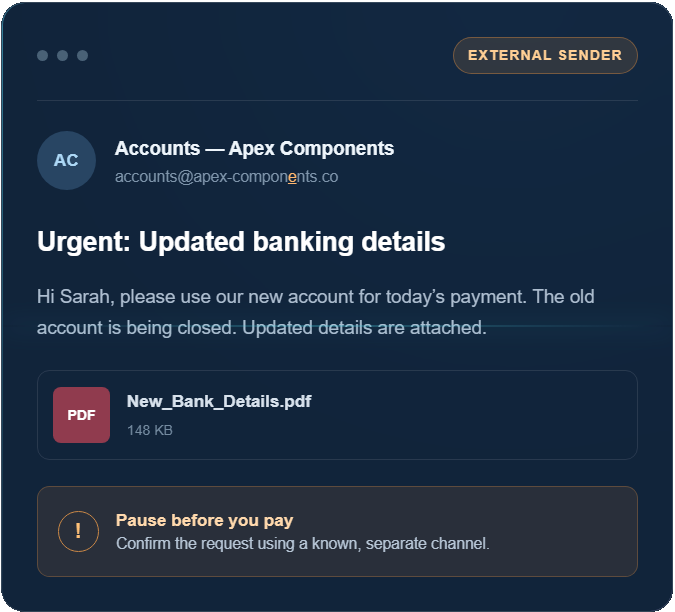
Payment details have ‘changed’

A supplier, employee or executive asks you to redirect an invoice, payroll or refund payment to a new account.

DO THIS

Verify using a phone number you already trust — never the contact details in the request.

Urgency replaces process

The message pressures you to act before a meeting, flight, deadline or late-payment penalty.

DO THIS

Slow down. Genuine urgency never removes the need for your approval process.

The message is almost right

A familiar display name hides a different address, a link uses a look-alike domain, or the writing style feels subtly wrong.

DO THIS

Inspect the full sender and destination. If in doubt, open the service from your own bookmark.

A SIMPLE CONTROL WITH A BIG IMPACT
Stop. Verify. Then act.

For bank detail, payroll or access changes, require an independent check and a second approver. If the request is genuine, the extra minute will be understood.

Your supply chain matters

Your security is only as strong as the partners you trust.

IT providers can hold privileged access to systems, backups and business data. Independent assurance such as ISO/IEC 27001 certification or a SOC 2 report gives you evidence that security controls are designed, managed and reviewed.

ASK EVERY CRITICAL SUPPLIER
Four Questions berore you hand over the keys
  • How is our data protected, accessed and retained?
  • How quickly are vulnerabilities and incidents handled?
  • Can you provide independent assurance, not only a policy document?
  • What happens to our data and access when the relationship ends?
Opal Logic is ISO/IEC 27001:2022 certified.
A LAYERED DEFENCE

Technology that supports better security habits.

No single tool makes a business secure. Opal Logic brings identity, endpoints, servers, networks and Microsoft 365 together — then actively manages the environment so each layer can cover the others’ blind spots.

KP
IDENTITY & CREDENTIALS
Keeper Password Manager for Business

Encrypted vaults, secure credential sharing, strong password generation, policy enforcement and administrator visibility — without passwords travelling through email or spreadsheets.

Unique passwords
Secure sharing
2FA & policy controls
WR
ENDPOINT DEFENCE
Webroot Endpoint Protection

Lightweight, cloud-managed protection that uses real-time threat intelligence and machine learning to help stop malware, ransomware and emerging attacks across business devices.

Threat prevention
Central policies
Fast deployment
UC
NETWORK PROTECTION
UniFi CyberSecure

Enhances a UniFi network with IDS/IPS threat intelligence and policy-based content filtering, helping reduce attack surfaces and improve visibility at the network edge.

IDS / IPS
Content filtering
Network visibility
M365
Identity, device & data
Microsoft 365 Business Premium

Brings together Microsoft 365 productivity with Entra ID, Intune, Defender and information protection to secure identities, devices, email, applications and business data.

MFA & access
Device management
Email protection
Nj
Monitor device health, performance and patching
NinjaOne - Continous Monitoring

NinjaOne gives Opal Logic a unified platform for securing, supporting, and managing all Windows, macOS, and Linux devices, with centralised endpoint monitoring, patch management, and remote access.

Software Patches
Device management
Central policies
Remote Control
MANAGED BY OPAL LOGIC
POWERED BY NINJAONE

Proactive management for your endpoints and servers.

Opal Logic uses NinjaOne to maintain central visibility across your managed devices, monitor health, automate approved operating system and third-party application patching, respond to alerts and provide secure remote support when it is needed.

Discuss managed IT support
01
Continuous monitoring

Visibility into device and server health, performance and issues.

02
Managed patching

Policy-based operating system and supported application updates.

03
Proactive maintenance

Automation and alerting help us address problems before they become disruption.

04
Remote support

Faster assistance for users and systems wherever they are located.

Products are only the beginning

Secure configuration, active management, staff awareness, documented processes and regular review turn product capability into business protection.

AUSTRALIAN GUIDANCE

Build towards the Essential Eight with a clear, measured plan.

E8
Essential 8

The ASD recommends the Essential Eight as a cyber security baseline. Your target maturity level should reflect your risks, environment and obligations.

ESSENTIAL EIGHT STRATEGY
PRIMARY SUPPORT IN THIS STACK
HOW IT HELPS
01
Application Control
Direct enabler
Microsoft 365

Intune and Defender policies can help control which applications and code are permitted to run.

02
Patch applications
Direct enabler
NinjaOne + Microsoft 365

Opal Logic uses NinjaOne to manage supported third-party application updates, with Microsoft policies complementing the broader patching workflow.

03
Patch operating systems
Direct enabler
NinjaOne + Microsoft 365

Managed patch policies and Microsoft update controls help standardise deployment and provide visibility across endpoints and servers.

04
Multi-factor authentication
Direct enabler
Microsoft 365 + Keeper

Entra ID and Keeper help require stronger authentication for cloud services and credential vault access.

05
Restrict admin privileges
Direct enabler
Microsoft 365 + Keeper

Identity roles, access policies and protected administrative credentials support least privilege.

06
Restrict Microsoft Office macros
Direct enabler
Microsoft 365

Microsoft security and device policies help block or constrain macros from untrusted sources.

07
User application hardening
Layered support
Microsoft 365 + security layers

Defender, Intune, Webroot and UniFi controls combine to reduce risky content, behaviours and attack paths.

08
Regular backups
Separate control
Dedicated backup & recovery

This requires a separate, tested backup design with appropriate retention, isolation and recovery procedures.


Alignment is not automatic maturity. Tools can enable controls, but Essential Eight maturity also depends on scope, configuration, operating processes, testing and evidence. Opal Logic can help assess gaps and build a practical improvement roadmap.

EVERYDAY SECURITY

Good security should feel like good business practice.

Make the safe action clear, repeatable and easy for people to follow. These six habits reduce risk across finance, operations and IT.

01
Verify money and access changes

Use a known phone number or separate channel, with a second approver for high-risk changes.

02
Use MFA and a password manager

Make unique credentials and strong authentication the default, not an optional extra.

03
Patch with urgency

Know what you own, prioritise critical vulnerabilities and keep operating systems and applications current.

04
Limit administrator access

Give people only the access they need, separate admin accounts and review privileges regularly.

05
Protect and test backups

Keep recoverable copies isolated from normal credentials and prove that restoration works.

06
Make reporting safe and fast

Reward early reporting. A quick call after a suspicious click can dramatically reduce the impact.

HOW OPAL LOGIC HELPS

From security concern to managed improvement.

We translate standards and product capability into a plan your organisation can operate.

01
Assess

Understand your environment, risks, current controls and Essential Eight baseline.

02
Prioritise

Focus first on the gaps most likely to create material business impact.

03
Implement

Configure the right technology, policies and practical staff workflows.

04
Improve

Monitor endpoints and servers, respond to alerts, and review controls as your systems and threat landscape change.

YOUR NEXT STEP
Know where you stand — and what to do next.

Start with a practical security posture review for your organisation.

COMMON QUESTIONS

Clarity before complexity.

01
Does buying these products make us Essential Eight compliant?

No. The products enable or strengthen several controls, but maturity depends on how controls are scoped, configured, operated, tested and evidenced across your whole environment.

02
Do all suppliers need ISO 27001 or SOC 2?

Assurance should be proportionate to risk. For suppliers with sensitive data or privileged access, independent assurance is valuable. Always check that its scope and currency cover the service you actually use.

03
Where should a smaller organisation start?

Start with visibility and the basics: MFA, unique passwords, prompt patching, tested backups, least privilege, phishing-resistant payment processes and a clear incident-reporting path.

04
What does Opal Logic’s NinjaOne managed service cover?

We use NinjaOne to centrally monitor and manage agreed endpoints and servers, apply managed patching policies, respond to alerts and provide remote support. The exact scope is tailored to your environment and support agreement.